
Grow a Garden Mutation Calculator Stack Multipliers Explained
Someone offers 80 million Sheckles for your 15 kg Sunflower with Rainbow growth and a Shocked mutation. Is that a good deal? By the formula on this page, the crop is worth about 106.9 million, but that only becomes clear once weight, growth, and mutation are all counted.
This tool prices one crop mutation or one pet mutation tier at a time and shows the mutation name under every result, so a wrong dropdown pick is easy to spot. The multipliers are community-sourced estimates, so check important numbers against the in-game sell screen.
Mutation Basics in Grow a Garden
A mutation in Grow a Garden (GAG) is a special effect that multiplies the base Sheckle value of one crop or pet by a fixed amount. Four sources produce mutations: weather events, pet activations, admin events, and automatic combinations of two lower mutations. Shocked at ×100 and Celestial at ×120 are two of the stronger weather mutations, and either one can lift a plain crop far above its normal price. Every multiplier feeds one result: the mutation value of that crop or pet.
Concrete numbers show how far mutation values can swing. A 10 kg Sunflower with a base value of 95 per kg and no mutation is worth 9,500 Sheckles under the community formula. Add Shocked, and the same crop is worth 950,000. A strong mutation on a heavy, high-base crop can be worth many times more than the same crop with no mutation.
Grow a Garden Mutation Calculator Overview
Four details go in and one Sheckle total comes out: the mutation, the base value, the weight (or age for pets), and the growth multiplier. The math follows a community-known formula, so results should land close to the sell screen when the inputs are exact, but they are estimates and can differ. Crop base values range from Sunflower at 95 per kg to Golden Egg at 225,600 per kg. Pet base values run from a Common Bee at 50 to a Prismatic Dragon at 135,000.
Crop and pet panels share no inputs and no saved state. Changing a crop never moves the pet result, so one session can price both without a reset. The Grow a Garden Mutation Calculator also prints the mutation name under every total, which makes a wrong dropdown pick easy to spot before a number reaches a trade chat.
How This Mutation Calculator Works
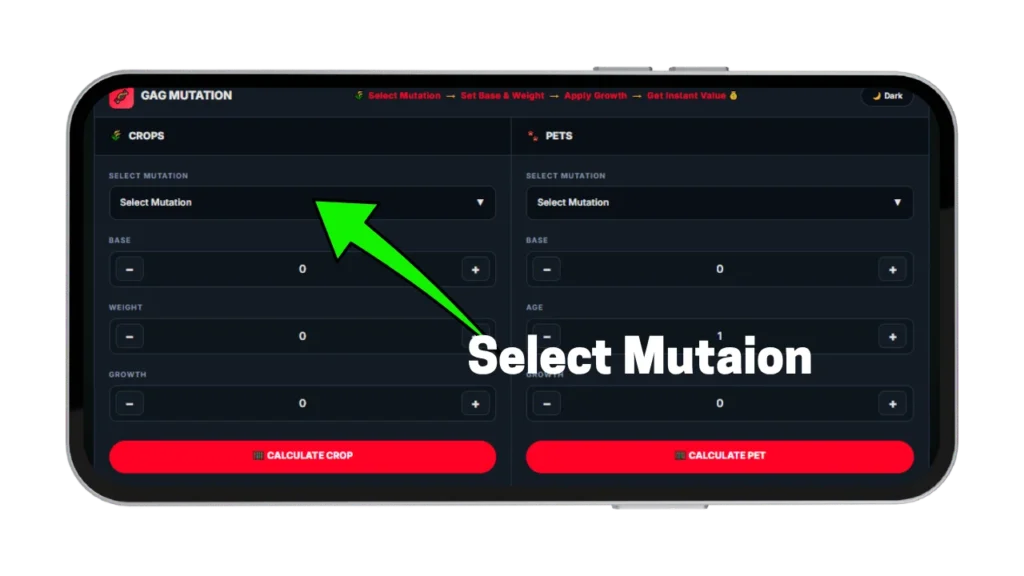
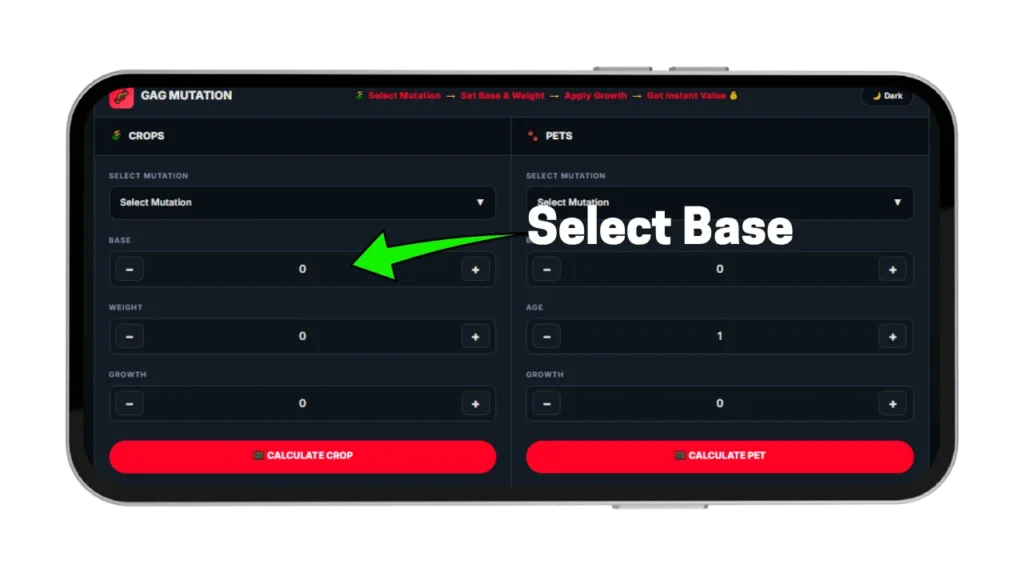
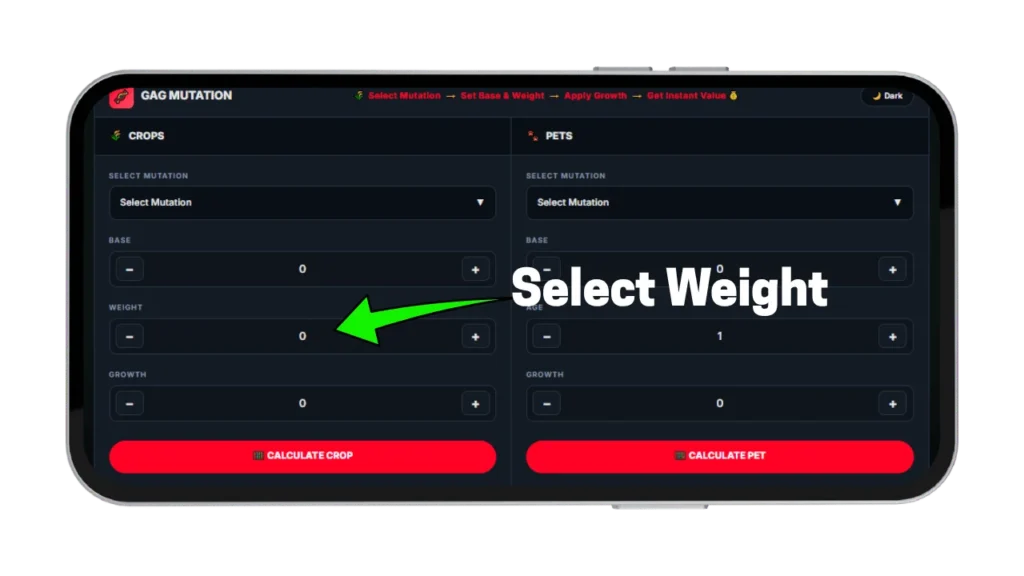
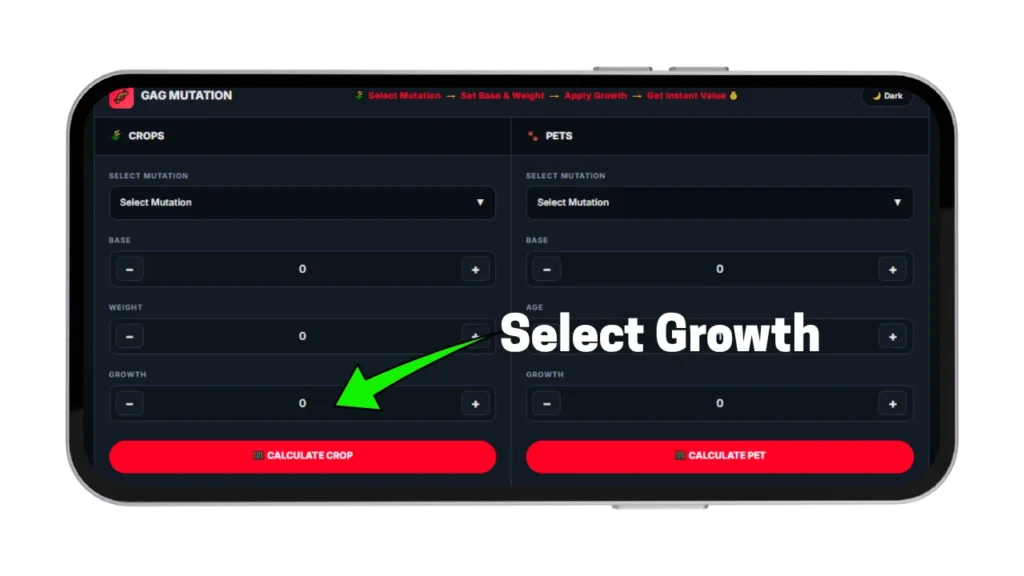
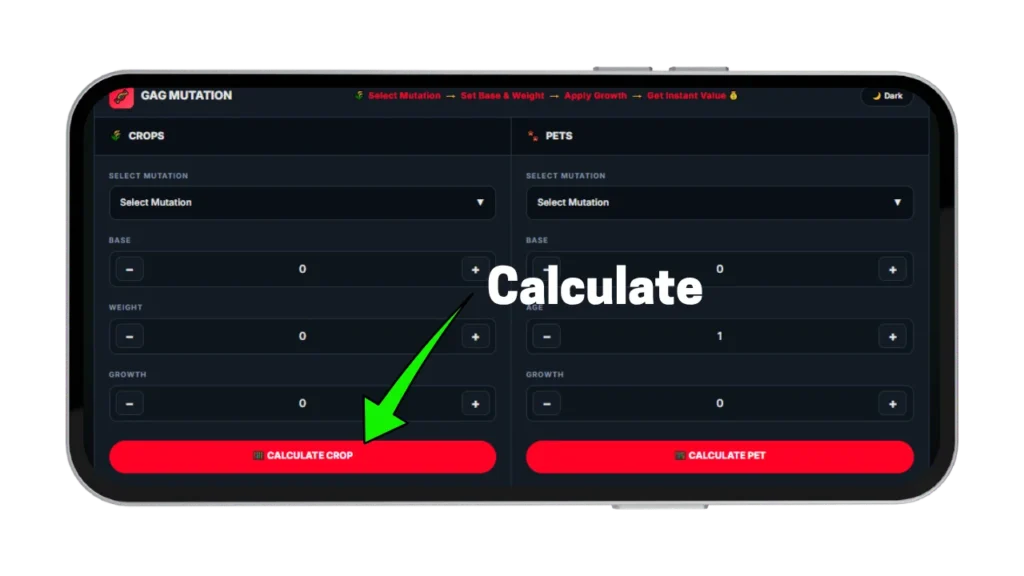
Both panels follow one pattern: pick a mutation, enter three values, and read the result. A confirmation line under the result names the mutation or tier that was applied. That line catches dropdown slips before they reach a trade chat. Crop and pet inputs mean different things, so each panel of this Grow a Garden mutations calculator has its own steps below.
Crop Mutation Calculator Steps
Open the crop dropdown, where every mutation is listed with an emoji, a name, and its multiplier, and pick the one on the crop. Type the base value per kg from the in-game crop card into the Base field. Reference values include Dragon Fruit at 210 and Fossilight at 79,400.
Enter the current weight in kg, then the growth multiplier, using 1 when no growth mutation is present. The Sheckle total then appears with the mutation name and multiplier beneath it.
Pet Mutation Calculator Steps
Open the pet dropdown in the calculator and choose the tier shown on the pet card in the inventory. Enter the pet’s base value, its current age, and its growth multiplier in the three fields. Base values follow rarity, so that field matters as much as the tier itself. The confirmation line then shows which tier was applied.
Grow a Garden Mutation Calculator Screenshots
The screenshots below show the Grow a Garden Mutation Calculator in use. Tap any image to view it at full size.
Crop Mutation Formula Explained
Crop value follows one formula, and it breaks when weight or multipliers are handled the wrong way. Community testing supports this version:
Squaring a weight means multiplying it by itself, so 5 kg counts as 25, 10 kg counts as 100, and 20 kg counts as 400. Many players assume mutations multiply each other, and that assumption produces prices the sell screen never matches.
Formula Breakdown: Base Value and Mutation Power
Take the Sunflower from the opening offer: base value 95, weight 15 kg, Rainbow growth at ×50, and Shocked at ×100. Fifteen squared is 225, and 95 times 225 is 21,375. Multiplying by 50 gives 1,068,750, and multiplying by 100 lands at 106,875,000. The crop is worth about 106.9 million Sheckles, roughly 26.9 million more than the 80 million offered.
Growth multipliers run on their own track, separate from the mutation, and go straight into the Growth field. Typing the same numbers into the calculator confirms each step.
Weight and Stacking Quantity Factors
Doubling weight quadruples value. The same Sunflower at 30 kg is worth 427.5 million Sheckles, four times the 15 kg result. Grow a Garden mutation multipliers magnify that gap, so a small weight difference at a high tier can move hundreds of millions. Weight is the strongest lever in the formula, and the Grow a Garden Fruit Calculator shows how it shapes plain crop prices before mutations enter.
This panel handles one regular mutation per entry, which suits quick checks. A crop with two or more regular mutations follows the additive rule, where mutations add together rather than multiply, and this tool does not calculate that case. Temperature effects and friend boost are also not included.
Pet Mutation Stacking Mechanics
Pet mutations run on a different system from crop mutations. Each pet holds one fixed tier, so the calculator has no stacking to work out on the pet side. The pet formula reads:
Picking the wrong tier ruins the whole result, so a quick check against the pet card is worth the five seconds.
Pet Tier Multipliers and Trade Value
| Pet mutation tier | Multiplier |
|---|---|
| None | ×1 |
| Golden | ×2 |
| Rainbow | ×2.5 |
| Frozen | ×3 |
| Disco | ×3.2 |
| Inverted | ×4 |
| Stormbound | ×4.2 |
| Cosmic | ×5 |
| Astral | ×5.5 |
| Goldsparkle | ×6 |
A Goldsparkle pet is worth exactly six times the same pet at the same age and growth with no mutation. The multiplier applies to the full result after age and growth are counted. For pet weight growth toward age 100, the Grow a Garden Weight Calculator covers a separate formula.
Pet and Crop Mutation Differences
Crop mutations come from weather, pet activations, and sprays, and several can combine through addition. Pet mutations are a single fixed tier, and two tiers can never share one pet. Goldsparkle, Cosmic, and Astral exist in both systems with very different values: ×500, ×240, and ×365 on crops, against ×6, ×5, and ×5.5 on pets, so each pair shares only a name. The calculator keeps the panels apart so a crop multiplier never leaks into a pet result.
Pet Mutation Rules and Machine Limits
Pet mutations are applied through the in-game Mutation Machine, and a pet must reach level 50 first. Once applied, the tier is permanent.
Only the confirmed rules are covered on this page. Machine costs and tier odds are not listed here because they have not been verified. Players still working toward level 50 can estimate the XP needed with the Grow a Garden Pet Calculator.
High-Multiplier Stack Combinations
Multipliers climb fast once weather events line up. This table lists the values behind the combinations below, ordered from lowest to highest. Only the multipliers behind the combinations below are charted here, and the complete mutation list on the Grow a Garden Wiki covers every other entry.
| Crop mutation | Multiplier |
|---|---|
| Wet | ×2 |
| Static | ×8 |
| Aurora | ×90 |
| Shocked | ×100 |
| Celestial | ×120 |
| Stormcharged | ×180 |
| Cosmic | ×240 |
| Astral | ×365 |
| Goldsparkle | ×500 |
Mutation Multiplier Lookup by Name
The crop dropdown is searchable, so any multiplier can be looked up by name in a few seconds. The list includes entries such as Cyclonic, Plasma, Oil, Bloom, Fortune, Chocolate, Aromatic, and Zombified. The pet side works the same way, and each tier can also be checked in the pet tier table above.
Shocked and Celestial Synergies
Shocked and Celestial can sit on one crop together. On the additive method, their multipliers add up to roughly ×220. A tool that multiplies them reports ×12,000 instead, which is about 55 times too high. A seller pricing from that inflated number asks far more than the crop is worth, and a buyer who believes it overpays.
Static and Stormcharged Chain
Raiju removes an existing Shocked mutation from a crop and applies the Static mutation in its place. That swap is the middle step of the Stormcharged chain, and at that step the multiplier falls from ×100 to ×8. The chain only pays off if it finishes at Stormcharged. Running Raiju without that plan can strip a valuable Shocked mutation from a crop, a loss the tool makes obvious when each stage is entered first.
Mutation Stacking Rules Every Player Must Know
Three rules apply to every crop, and none has an exception. They sit inside the formula, so no amount of in-game experimenting changes them. Breaking one of them on the input side produces a result the game will not match.
One Growth Mutation Per Crop
Only one growth mutation can exist on a crop at a time: Silver ×5, Gold ×20, Rainbow ×50, or Diamond ×50. Gold belongs to this track, so it never stacks with Rainbow or Diamond. Growth mutations apply above the regular mutation result, and the Growth field takes the matching multiplier, or 1 when none is present. Any listing that claims a crop carries both Rainbow and Diamond is wrong.
Combined Mutations Form From Two Base Mutations
Frozen forms when Wet and Chilled are active together, so Frozen only appears after both. Cosmic needs Celestial and Aurora, and Astral needs Cosmic and Galactic, so Astral takes at least three separate weather events. A combined mutation enters the formula once, at its full value. Selecting the final combined mutation from the dropdown in the calculator is correct, while typing in its parts separately is not.
Temperature and Weather Mutation Conflicts
Wet, Chilled, and Frozen cannot coexist, since Frozen replaces the other two when it forms. Burnt and Cooked also conflict within the heat group, so Burnt never stacks with Cooked. Bloodlit and Moonlit conflict because Blood Moon replaces standard Night. A seller who lists conflicting mutations on one crop is either mistaken or misrepresenting it.
How to Trigger Every Mutation Category
Chasing a top-tier mutation takes a plan, because each source has its own timing. Missing a Meteor Shower while Legendary crops sit unharvested means missing Celestial for that whole event. Weather windows close, and nothing outside another event brings the mutation back.
Weather Mutations and Forecast Farming
Shocked lands during Thunderstorm or Jandel Storm weather when lightning strikes a crop. Celestial comes with Meteor Shower events, and Aurora needs Aurora Borealis weather. Wet applies during Rain or Thunderstorm and is the base for Frozen once Chilled arrives from Frost weather or a Polar Bear pet. High-rarity, heavy crops belong in open plots during these windows, since weather mutations cannot be triggered outside the event.
Pet-Applied Mutations and Their Pets
Dragonfly applies Gold to one random crop every five minutes, which makes it the most reliable Gold source beyond the natural one percent spawn chance. Goldfinch applies Goldsparkle with a low activation chance and is the only non-admin source of the top crop mutation. Raiju belongs to the Stormcharged chain covered earlier, so that section is worth a read before the pet goes to work. Entering the crop into the Grow a Garden Mutation Calculator before and after a pet session shows exactly what each activation added.
Grow a Garden Mutation Calculator vs Spreadsheets
Spreadsheets handle any formula, but only after someone types it in correctly. One wrong cell, such as treating weight as a straight line instead of a square, turns every row into a bad price. Multiplier lists inside a spreadsheet also stay frozen until the owner edits them by hand, which is why a calculator with the formula built in is less error-prone.
A dedicated calculator has the multipliers built in and prints the mutation name under every result, so a wrong dropdown pick shows at once. Spreadsheets still win for custom batch work, such as pricing a whole garden row by row, where a single-entry tool is slower.
Tips to Maximize Mutation Multiplier Yields
Three habits turn one-off checks with the calculator into steady gains. Each takes a few minutes and removes a guess from the process. They matter most before a trade, when time pressure pushes toward estimates.
Exact Base Values From the Game
Base value per kg is shown on every crop card and on the sell screen, so the exact number should be typed in, not a rounded one. On the 15 kg Rainbow-Shocked Sunflower, a base typed as 195 instead of 95 adds 112.5 million Sheckles to the result. An error that size can flip a fair deal into a bad one.
Combination Chains Before Farming
Used as a mutation planner, the calculator can test a chain such as Astral before any sessions are spent on it. Enter the crop’s base value and weight at the Galactic, Cosmic, and Astral stages separately. The jump at each step shows whether stopping at Cosmic beats finishing the chain. Comparing the stages one by one takes about two minutes and can save hours of farming toward a chain that does not pay off.
Result Before Offers Arrive
Calculate a crop the moment it finishes growing and note the number. With a floor price already set, an offer can be judged calmly instead of rushed. For a verdict on a specific deal, the Grow a Garden Trade Calculator compares both sides and returns win, fair, or lose.
Pros and Cons of the Mutation Calculator
Every tool has trade-offs, and this tool is no exception. These lists show where it helps and where another tool fits better.
Pros
- 160-plus crop mutations in one dropdown
- Pet tiers on the same page
- Mutation name confirmed under every result
- Crop and pet panels work independently
- Free on every device, no login
Cons
- Handles only one regular mutation per entry
- New mutations may lag after patches
- Crop base value needs manual entry
- No temperature effect or friend boost
- No save or export option
The biggest gap is the single-mutation limit. For crops with stacked effects, apply the additive rule explained above and check the result against the in-game sell screen.
Frequently Asked Questions
Conclusion: Mastering Mutation Synergies
Mutation value comes down to three things: which mutation is active, how much the crop weighs, and whether the formula was applied correctly. Squared weight turns small gaps into large ones, and the Rainbow-Shocked Sunflower from the opening offer shows how far a guess can drift. Running the Grow a Garden Mutation Calculator before a harvest, instead of after an offer, keeps that gap visible.
Next steps depend on the task: deal verdicts, pet XP, egg odds, and every other formula each have their own tool on this site. One more crop checked before the next harvest is one less guess in the next trade chat.