
Grow a Garden Fruit Calculator Plant Value, Price & Crop Guide
You just harvested a Dragon Fruit at 8 kg with a Shocked mutation on it. Someone offers you 500 million Sheckles and the timer is running. You have never calculated what that fruit is actually worth and you are about to guess on a trade worth billions. This Grow a Garden Fruit Calculator gives you the exact number before you type a single reply.
🍎 FRUIT CALCULATOR
Select your fruit from the preloaded list, enter the weight, pick your crop mutation and growth variant, and the Sheckle total appears instantly with every multiplier shown separately. Multi-harvest fruits calculate across your full plant count in one step. Free on every device. No login. No download.
What Is the Grow a Garden Fruit Calculator?
Every fruit in Grow a Garden has a base Sheckle value per kilogram and what happens to it after weight, crop mutations, and growth variants are applied is what most players get wrong. A Dragon Fruit at 1 kg is worth its base value — that same Dragon Fruit at 8 kg is not worth eight times more but sixty-four times more because weight is squared in the formula. Add a Shocked mutation and a Rainbow growth variant on top and that same fruit is worth billions before anyone approaches you with an offer.
This tool is built for quick single-fruit estimates before a trade or harvest decision — select your fruit, enter the weight, choose your dominant crop mutation, and pick your growth variant. The result panel shows weight ratio, weight squared, mutation multiplier, growth multiplier, per-fruit value, and the total across your full harvest in one view. For crops carrying multiple stacked mutations simultaneously use our main Grow a Garden Calculator which handles the full additive formula this tool does not model.
How to Use the Fruit Calculator?
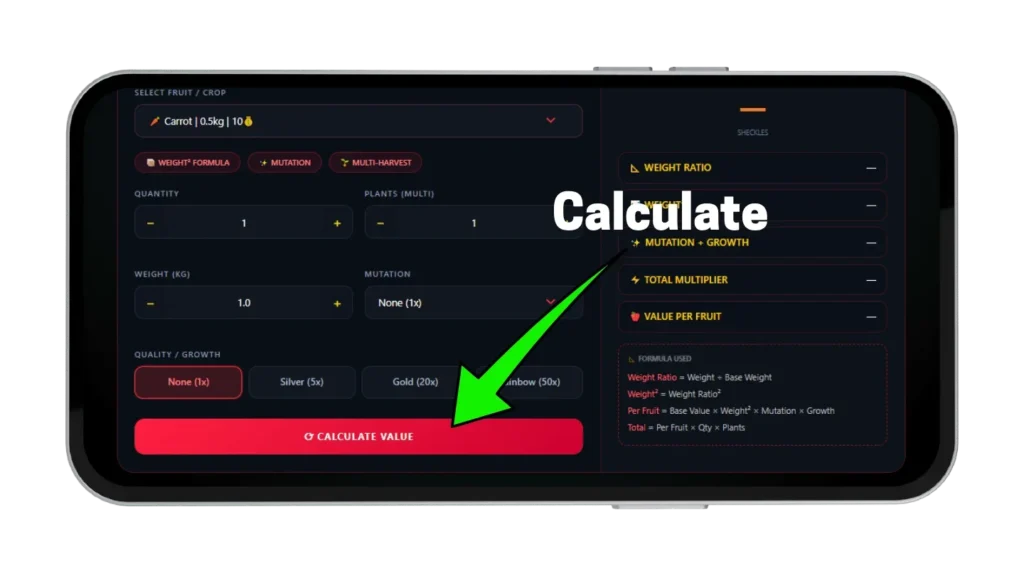
Four inputs and one button give you a complete Sheckle result. Every input feeds into the formula simultaneously and the result panel shows six labeled values so you can verify each step before using the number in any trade. Understanding what each input controls before your first calculation prevents the most common input errors that produce wrong results on high-value fruits.
Select Your Fruit
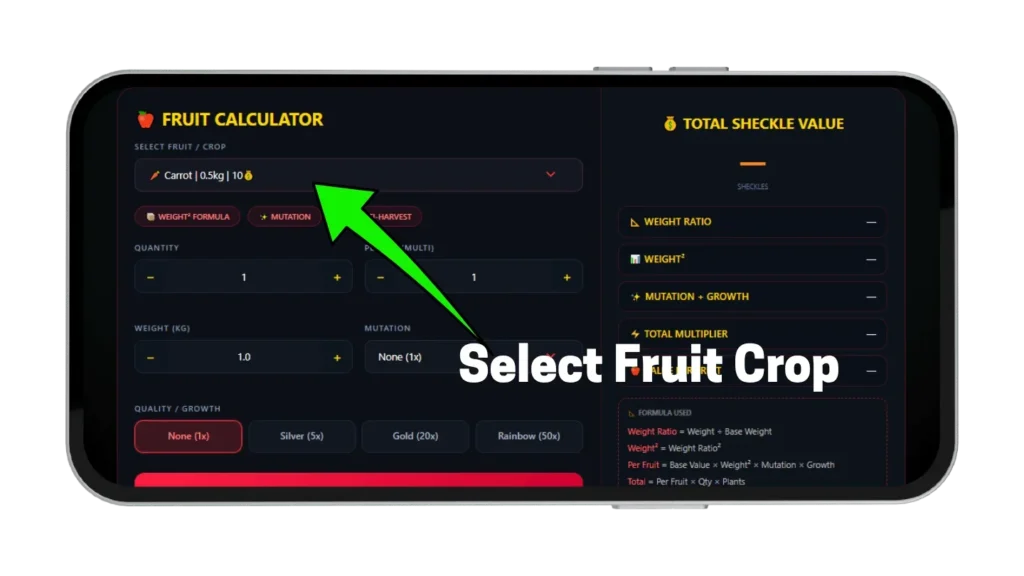
Click the fruit dropdown and select your fruit — every entry shows its name, base weight in kg, and base Sheckle value per kg. Dragon Fruit shows 1.2 kg base weight and 120 Sheckles base value per kg. Moon Melon shows 2.0 kg base weight and 200 Sheckles base value per kg. The base weight is used to calculate the weight ratio — how much heavier your actual fruit is compared to the standard base for that fruit type. Select the fruit that matches yours exactly before entering any other value.
Enter Weight, Quantity, and Plant Count
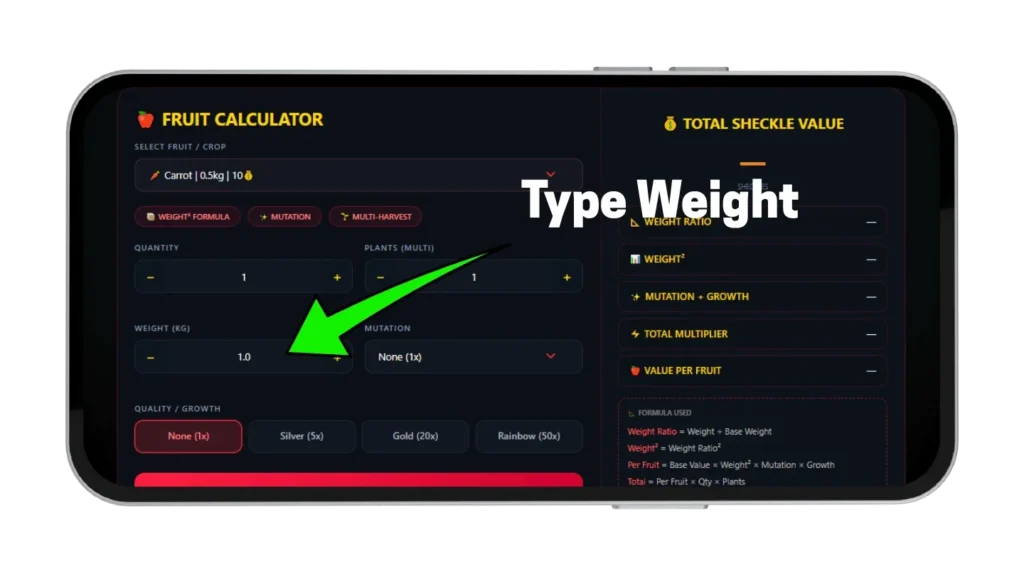
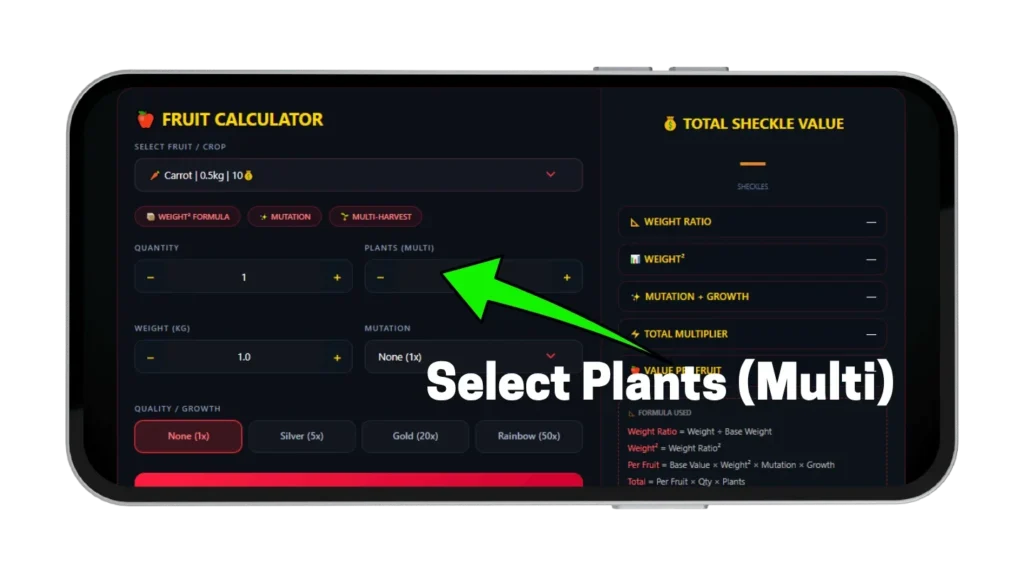
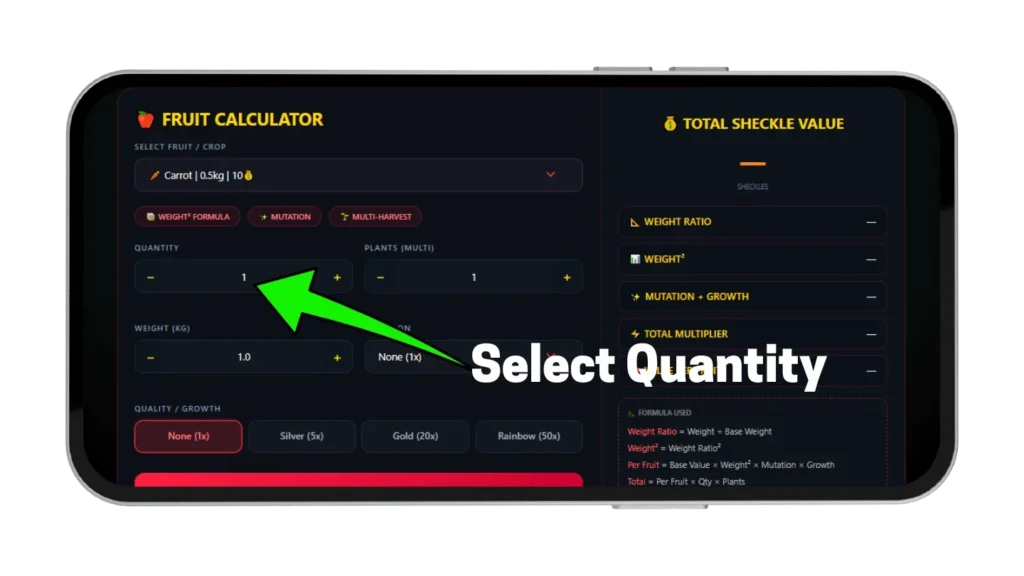
Type your fruit’s current weight in kg exactly as shown in the game using the weight stepper. Enter how many individual fruits you are calculating in the quantity field. Use the Plants input to multiply across all active plants simultaneously — three fruits across four plants gives twelve total, so enter three in quantity and four in plants. The total calculates automatically from all three inputs combined.
Select Crop Mutation and Growth Variant
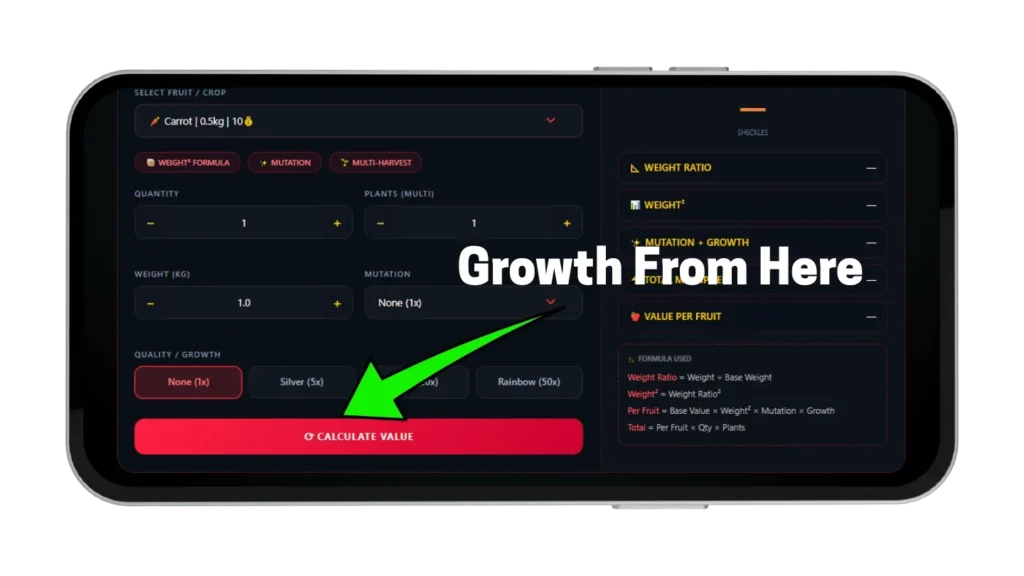
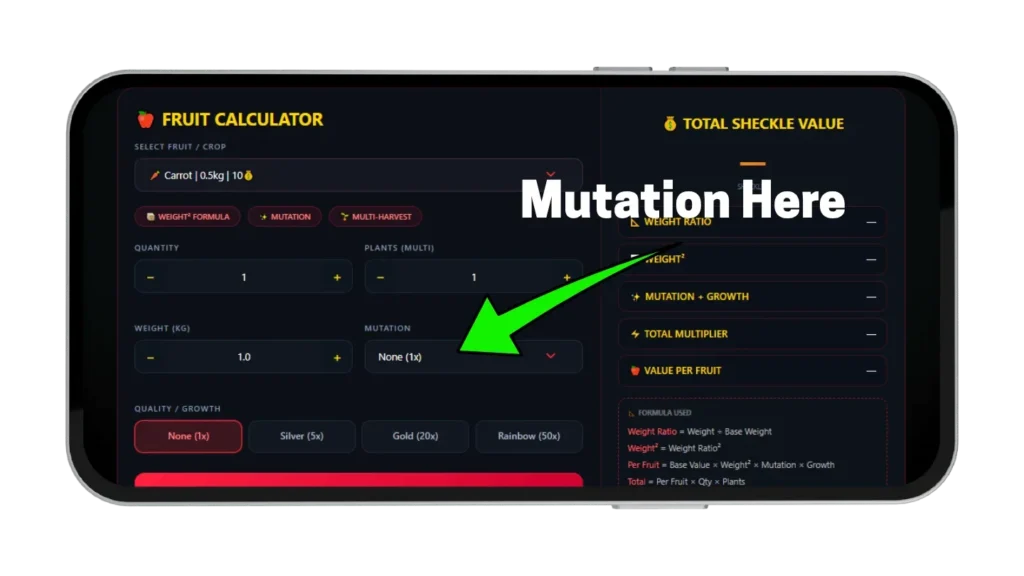
Pick your crop mutation from the dropdown — options include None at ×1, Shocked at ×100, Celestial at ×120, and Dawnbound at ×150. Select your growth variant separately — None, Silver at ×5, Gold at ×20, or Rainbow at ×50. Both dropdowns feed into the formula on completely separate tracks — a Rainbow Shocked fruit is not ×150 combined. Rainbow multiplies the entire result of the weight and mutation calculation from its own separate track above everything else.
Read Your Results
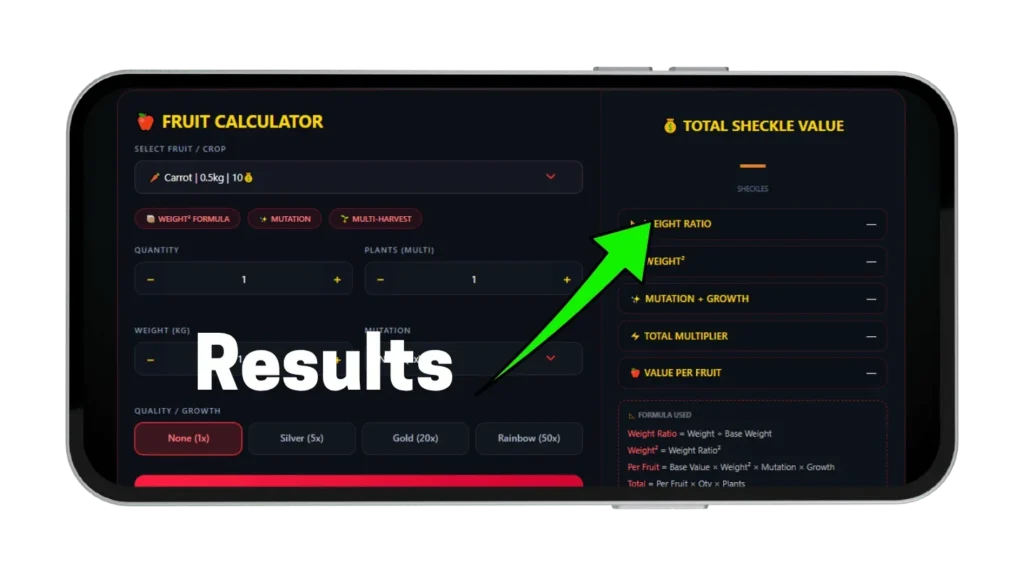
The right panel shows six values the moment you click Calculate. Total Sheckle value is the headline number at the top. Weight ratio shows how your actual weight compares to the base weight for that fruit type. Weight squared shows the ratio after squaring — this is what actually multiplies into base value. Mutation and Growth shows the combined multiplier from both dropdowns applied separately. Value per fruit shows what a single fruit is worth before quantity and plant count multiply it.
How Fruit Value Is Calculated in Grow a Garden
The formula behind every Sheckle value in this tool is the same one the game runs internally. Understanding it prevents every major pricing mistake players make in trades and explains why two fruits of the same type at different weights can have dramatically different values. Most players assume weight adds linearly to value — it does not, and this single misunderstanding costs millions of Sheckles every session on high-value fruits.
The Weight Ratio Squared Formula
The formula is Per Fruit Value equals Base Value multiplied by Weight Ratio squared, multiplied by Mutation Multiplier, multiplied by Growth Multiplier. Weight Ratio is your actual weight divided by the fruit’s base weight — if your Dragon Fruit weighs 8 kg and the base weight is 1.2 kg, the ratio is 6.67 and squared that becomes 44.4. Every Sheckle of base value is multiplied by 44.4 before any mutation or growth applies. This is why a heavy fruit with no mutations can be worth more than a light fruit with a mid-tier mutation.
Why Heavy Fruits Multiply Value Faster
Weight is squared not added — a fruit at twice the base weight produces four times the value, not double. A fruit at three times the base weight produces nine times the value, and a Grand Volcania at 9 kg versus 3 kg is worth nine times more assuming identical mutation and growth variant. Letting high-rarity fruits grow longer before harvesting is the single highest-return decision available in any farming session.
How Multi-Harvest Fruit Totals Work?
Multi-harvest fruits like Dragon Fruit, Mango, Pineapple, Coconut, Strawberry, and Blueberry regrow after being picked and produce value repeatedly over a session without replanting. Use the Plants input to multiply your per-fruit result across all active plants simultaneously so the full session harvest value appears before you pick a single fruit. Single-harvest fruits disappear after one pick and their timing decision matters more — calculate each one individually before harvesting to confirm the weight and mutation combination is worth collecting now versus waiting.
All Fruits and Their Base Values
Every fruit in this calculator uses its verified in-game base value per kg and standard base weight. Knowing where your fruit sits in the value table before entering any trade helps you set a realistic floor price before anyone approaches you. The dropdown shows base weight and base value on every entry so you can confirm the correct fruit is selected before calculating. Base values range from Strawberry at 20 Sheckles per kg all the way to Golden Egg at 1,000 Sheckles per kg — that range means a ×100 Shocked mutation produces dramatically different results depending on which fruit it lands on.
Common Fruits
Strawberry at 20 Sheckles per kg, Blueberry at 25, Banana at 22, Grape at 12, and Peach at 55 are the lowest base value fruits in the tool. A Strawberry at 10 kg with Shocked ×100 and Rainbow ×50 still produces multi-billion results because the weight ratio squared at that weight overwhelms the low base value — but the same mutation stack on Dragon Fruit at 120 Sheckles per kg produces a result more than six times higher. Common fruits are useful for learning the formula and as part of multi-plant harvest sessions where volume compensates for low individual value.
Mid-Tier and High-Tier Fruits
Mango at 90 Sheckles per kg, Dragon Fruit at 120, Pineapple at 110, and Coconut at 95 sit in the mid-tier range where even lower mutation tiers like Aurora ×90 or Celestial ×120 produce meaningful results worth protecting in any trade. High-tier fruits like Moon Melon at 200, Aetherfruit at 800, Golden Egg at 1,000, and Grand Volcania at 500 Sheckles per kg produce results most players only see once — a Golden Egg at 6 kg with Rainbow growth and Celestial mutation produces a number that changes the entire conversation before a single word is typed.
Growth Variants — Silver, Gold, and Rainbow
Growth variants are the rarest outcome in fruit spawning and apply on a completely separate multiplier track above everything else in the formula. They are not crop mutations — they are independent multipliers that appear at spawn time with low probability and cannot be applied through weather events the same way regular crop mutations can. Getting this distinction right before entering growth variant inputs into this calculator is what separates accurate results from slightly wrong ones that compound into large Sheckle errors at high base values.
What Each Growth Variant Does
Silver applies a ×5 multiplier to the entire calculated value and has a 10 percent natural spawn chance. Gold applies ×20 and has a 1 percent natural spawn chance, while Rainbow applies ×50 and has a 0.1 percent natural spawn chance — only one can exist on a fruit at a time. Rainbow is the most valuable single addition any fruit can carry because it multiplies everything the weight, base value, and crop mutation already produced by 50 before a single Sheckle is collected.
How to Get Each Growth Variant
Silver spawns naturally at 10 percent chance and can be applied by Silver Fertilizer gear. Gold spawns naturally at 1 percent and can be applied by the Dragonfly pet approximately every five minutes on one random fruit. Rainbow spawns naturally at 0.1 percent chance and can be applied by the Butterfly pet to any fruit that already carries five or more mutations. Enter your fruit into this calculator at Gold and then at Rainbow to see exactly how much the upgrade is worth in Sheckles before deciding which to target in your next farming session.
How Crop Mutations Work in This Fruit Calculator?
The mutation dropdown in this tool contains crop mutations only — these are multipliers applied through weather events, pet activations, and mutation sprays during or after fruit growth. They are completely separate from pet mutation tiers which have no connection to fruit value calculations in this tool. Selecting Shocked from this dropdown applies the crop Shocked mutation at ×100 — for fruits carrying multiple crop mutations stacked simultaneously use our mutation calculator which handles the full additive formula this tool does not model.
Which Crop Mutations Produce the Biggest Jumps?
Shocked ×100 from Thunderstorm weather is the most reliably farmable high-multiplier crop mutation available without admin involvement and produces multi-billion results on any mid-tier fruit at good weight. Celestial ×120 from Meteor Shower events sits above Shocked and lands on unharvested fruits during the event window without any additional action required. Dawnbound ×150 is the highest crop mutation in this dropdown but is exclusive to Sunflower crops during Sun God events — when it does appear on a heavy fruit with Rainbow growth the result is one of the highest values achievable in standard gameplay.
Multi-Harvest vs Single-Harvest Fruits
Whether a fruit regenerates after harvest changes how you plan your farming session and how you use this calculator before picking. Multi-harvest fruits compound value across a session while single-harvest fruits require precise timing decisions that this calculator helps you make before any fruit is pulled. Understanding which category your fruit falls into before calculating prevents session planning mistakes that cost Sheckles without any visible calculation error.
Multi-Harvest Fruit Strategy
Dragon Fruit, Mango, Pineapple, Coconut, Strawberry, and Blueberry all regrow after picking and produce value repeatedly without replanting. Enter three fruits per plant and four plants in the calculator and the full twelve-fruit session total appears before you harvest a single one — use this to decide whether to wait for a weather event mutation that would significantly lift the per-fruit value. Knowing your session total before harvesting begins lets you compare the current number against what a Shocked or Celestial mutation would add so you can make the timing decision with real numbers rather than estimates.
Single-Harvest Fruit Strategy
Watermelon, Avocado, and Kiwi disappear after one pick and their value cannot be accumulated the same way multi-harvest fruits can across a session. Calculate each single-harvest fruit individually before picking — especially for high-base-value fruits like Golden Egg at 1,000 Sheckles per kg where letting the fruit reach maximum weight before picking makes a far larger Sheckle difference than on any multi-harvest fruit at the same base value. The weight squared formula means two more kilograms on a Golden Egg at heavy weight adds more value than most secondary crop mutations can contribute to the same fruit.
This Calculator vs Other Tools
Most fruit value tools for Grow a Garden show a table of base values and stop there — the gap between a table and a calculator is the difference between knowing Dragon Fruit starts at 120 Sheckles per kg and knowing your Dragon Fruit at 8 kg with Shocked and Rainbow is worth over 4 billion Sheckles before you accept any trade offer. The most common error on competing tools is applying weight as a flat multiplier instead of squaring the weight ratio — a Dragon Fruit at 8 kg using flat weight gives a result approximately 44 times lower than the correct formula produces on that same fruit.
This tool shows weight ratio and weight squared as separate labeled values in the result panel so you can confirm the correct base weight is being applied before reading the final number. Growth variants and crop mutations apply on separate tracks and the result panel shows each step explicitly so there is no black-box result to accept without understanding. For full additive stacking on fruits carrying multiple mutations simultaneously the main Grow a Garden Calculator handles the complete formula including temperature effects, friend boost, and unlimited mutation stacking that this simplified tool does not cover.
Tips to Maximize Fruit Value
These three habits produce measurably higher Sheckle totals from the same fruits in the same session time without requiring admin events, rare pets, or anything outside standard gameplay. The players who know their number before a trade conversation starts consistently get better deals than those who find out what their fruit was worth after accepting. Calculate before you pick, not after — the number is already waiting.
Always Let High-Base-Value Fruits Reach Maximum Weight
Weight ratio squared means every extra kilogram adds more value than the kilogram before it — a Golden Egg at 3 kg versus 6 kg is not twice the value but four times because the ratio goes from 3.75 to 7.5 and the square goes from 14 to 56. Use this calculator to compare your fruit value at current weight versus two more kilograms before deciding when to harvest. The Sheckle difference at high mutation stacks is often larger than an entire additional harvest from the same plant.
Prioritize Rainbow on High-Base-Value Heavy Fruits
Rainbow growth at ×50 multiplies the entire result of the weight and mutation calculation — on a high-base fruit at heavy weight with a strong mutation it produces a result that no other single addition can match. A Golden Egg at 6 kg with Shocked ×100 and Rainbow ×50 produces a higher result than the same Golden Egg with Dawnbound ×150 and no growth variant because Rainbow’s ×50 track multiplies everything that already exists. Enter both combinations into this calculator before your next farming session to see exactly which scenario is worth targeting.
Use Multi-Harvest Plants to Compound Session Value
Four Dragon Fruit plants producing three fruits each at good weight gives twelve calculable harvests in a single growing session — enter three in quantity and four in plants and the full session total appears instantly. Knowing your session total before harvesting begins lets you decide whether to wait for a Thunderstorm event that would apply Shocked ×100 to every plant simultaneously or whether the current number without the mutation is already worth collecting. This decision takes under thirty seconds with this calculator and consistently saves hours of farming toward a total that a single weather event could have produced in one session.
Pros and Cons
Pros
1: Weight ratio squared applied correctly — not flat weight multiplication
2: Per-fruit value shown alongside total for independent verification
3: Multi-harvest plants calculated in one step using the Plants input
4: Growth variants and crop mutations shown on separate result lines
5: Free on every device with no login needed
Cons
1: Single crop mutation per calculation — not full additive stacking
2: Fruit list covers key fruits only — for full crop database use the main calculator
3: Base values may lag after major game patches
4: Friend boost not included — use main calculator for full formula
5: All inputs entered manually — no in-game auto-fill
Faqs
Conclusion
Every fruit you grow in Grow a Garden has a calculable Sheckle value before you pick it — the players who know that value before a trade conversation starts consistently come out ahead. This Grow a Garden Fruit Calculator gives you that number in under thirty seconds with weight ratio squared, crop mutation applied, growth variant multiplied, per-fruit value shown, and session total ready before anyone approaches you.
For full additive stacking on fruits carrying multiple mutations simultaneously use our mutation calculator. For the complete crop value tool with friend boost, temperature effects, and unlimited mutation stacking use our main Grow a Garden Calculator.