
Grow a Garden Trade Calculator: WFL Trade Value Checker
A stranger offers a Celestial, a Galactic, a Wisp, and a Griffin for one Prismatic Dragon and calls it an even swap. Four pets sounds like more, yet the base values add up to ¢621.8K against ¢1.22M, a ratio of 0.51. The Grow a Garden Trade Calculator shows that gap in one click, before anyone accepts anything.
This page compares two pet offers side by side, applies each side’s multipliers, and returns a Win, Fair, or Lose verdict with the exact gap in Sheckles, the game’s main currency. Pet values come from community testing rather than from Roblox, and the grid of 38 pets was last checked in May 2026. The tool runs in any browser, asks for no Roblox login, and never touches an account or asks for payment. Think of it as the trade calculator Grow a Garden players open before every swap, whether they need a quick WFL trade check or a full Grow a Garden trade value calculator for a big package. Set both offers in the calculator below, then read the verdict carefully before sending a reply.
What Is the Grow a Garden Trade Calculator?
This trade calculator is a free browser tool that compares two pet offers and rates the trade as Win, Fair, or Lose. WFL is the short form players use for those three results. Many players shorten the game’s name to GAG, so the tool is also searched for as a GAG trade calculator. It doubles as a Grow a Garden pet trade calculator for single swaps and a trading calculator for Grow a Garden packages with many pets. Each side gets its own mutation tier and growth form, which lets an uneven trade, such as a mutated pet against a plain one, be priced correctly.
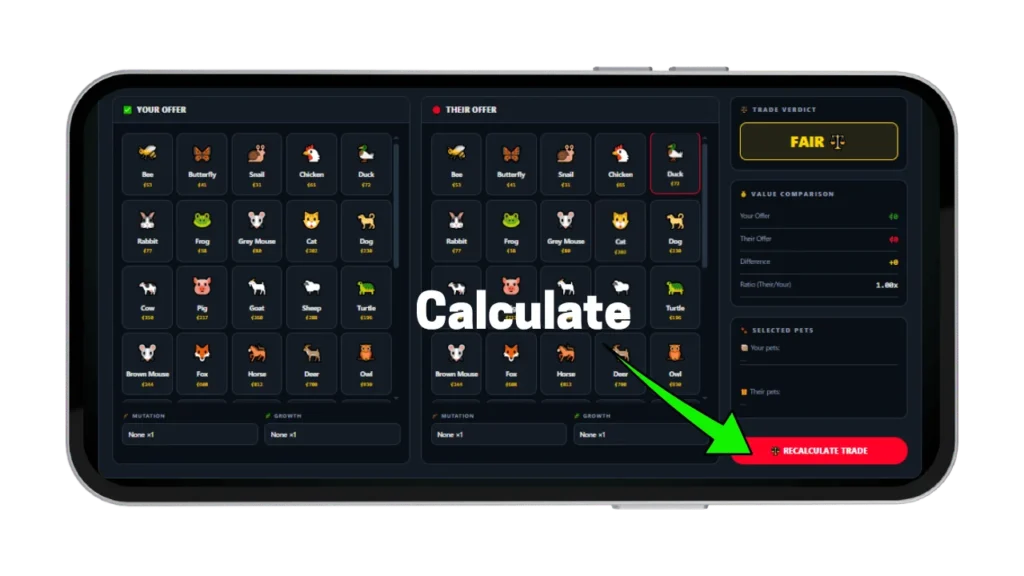
Bad pet trades usually start with a guess. An offer arrives, the other player waits, and a quick guess becomes an accepted trade. The tool replaces that guess with a number: each side is added up, the multipliers are applied, and the two totals are compared. Every click on a card or dropdown refreshes the result instantly, and as a Grow a Garden trade checker it returns the same answer every time for the same inputs.
How This Trade Calculator Works
Both offers run through the same formula at the same time. The tool adds the base value of every selected pet, multiplies that total by the side’s mutation tier and growth form, and then compares the two results. Like any GAG trading calculator, it is only as accurate as the settings behind it, so both sides need a full check before the verdict counts. Building one side completely before starting the other shows how each added pet moves the result.
Adding Your Offered Pets
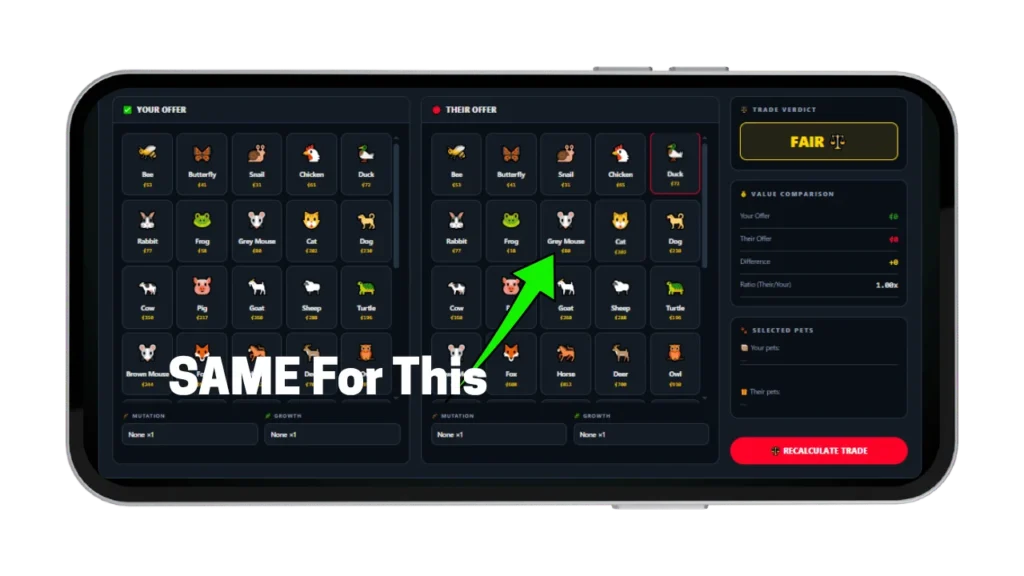
Inside the Grow a Garden trade calculator, clicking a pet card in the Your Offer panel turns it green and adds its base value to the running total. More pets can be added one click at a time. The mutation menu for that side runs from None ×1 up to Goldsparkle ×6, and the growth menu works the same way. Both menus need to be set before the verdict is read, because the total changes the moment either one moves.
Adding Their Offered Pets
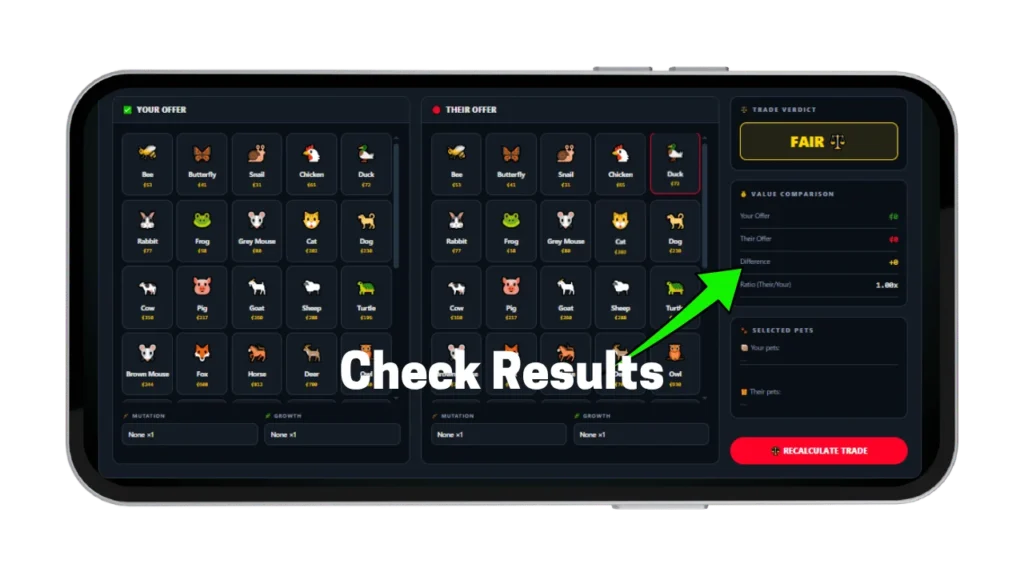
The Their Offer panel works the same way, with chosen cards highlighted in cyan. Its mutation and growth menus are separate from the first side, so a Rainbow ×2.5 pet against a Frozen ×3 pet is priced correctly in one pass. When the other player changes the offer mid-chat, clicking different cards updates all four sidebar numbers at once. Those numbers are the two totals, the Sheckle difference, and the ratio.
Reading and Interpreting Your WFL Verdict
A WFL calculator is only useful when the result is read correctly, so start with the verdict card. It shows Win in green, Fair in gold, or Lose in red. The Sheckle difference below it gives the exact gap, and the ratio divides the other side’s total by the first side’s total. The Grow a Garden trade calculator treats a ratio of 1.00 as a perfect match. A ratio of 1.12 and a ratio of 1.02 are both Fair, but they describe different trades, and the ratio makes that difference visible.
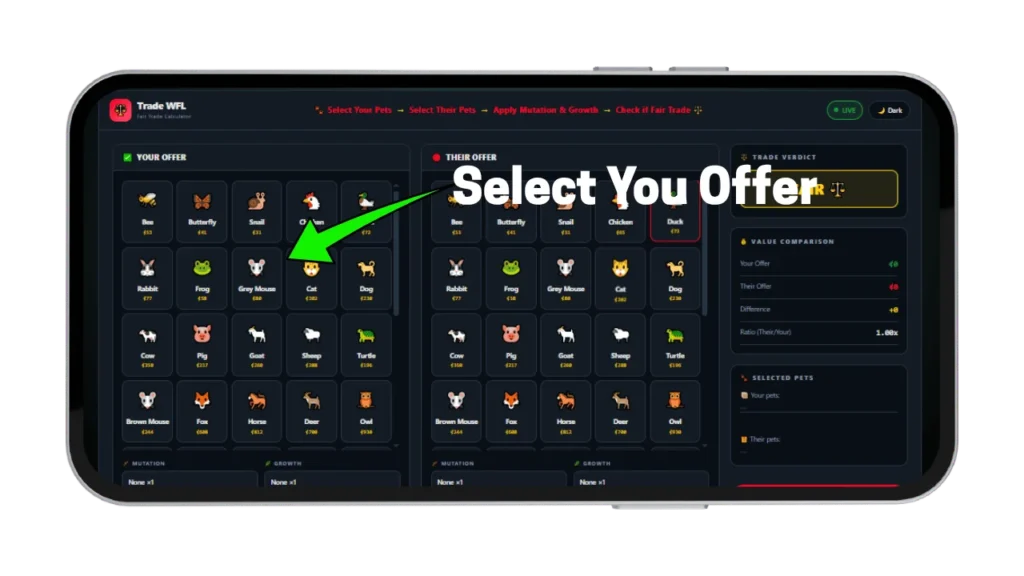
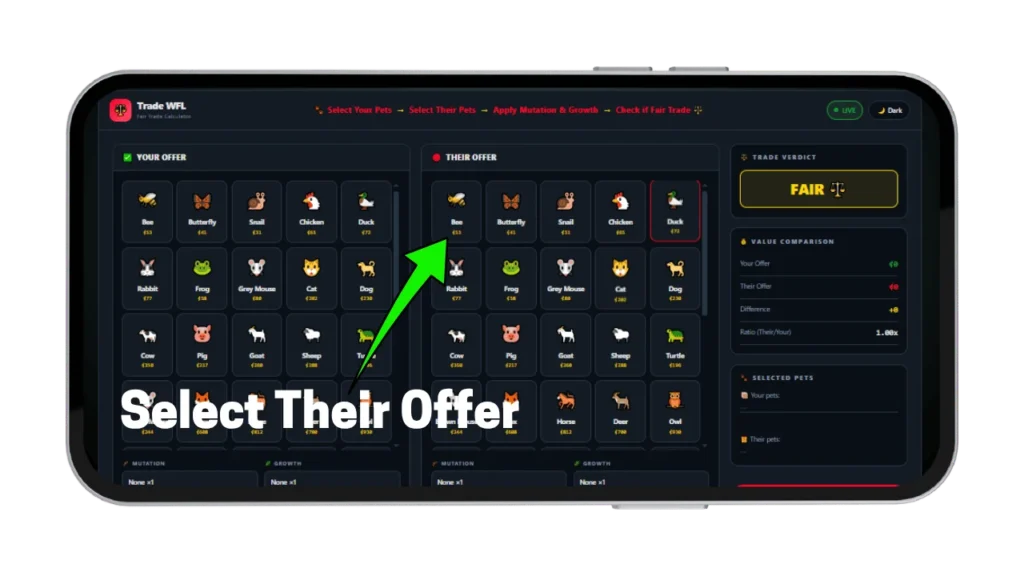
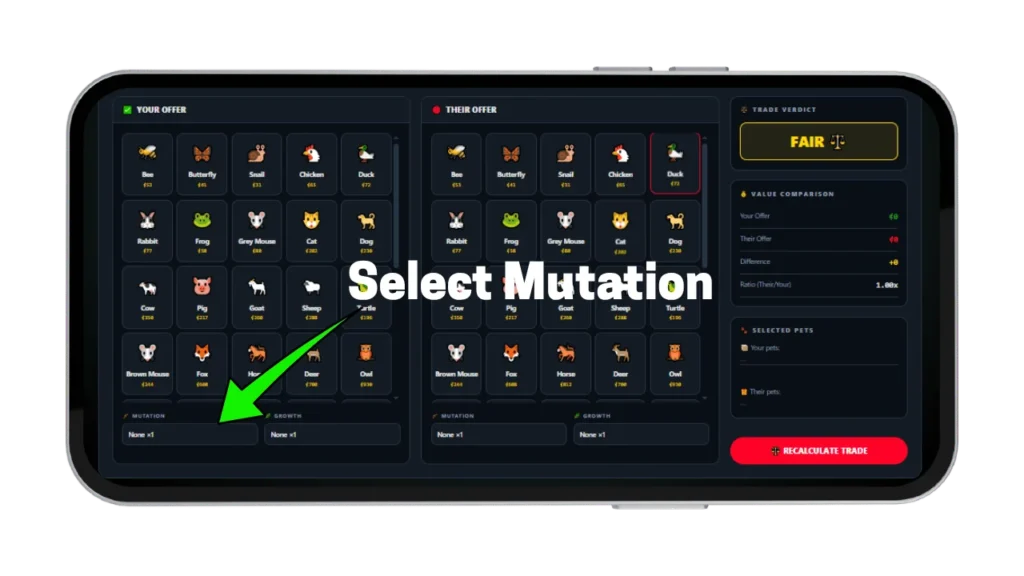
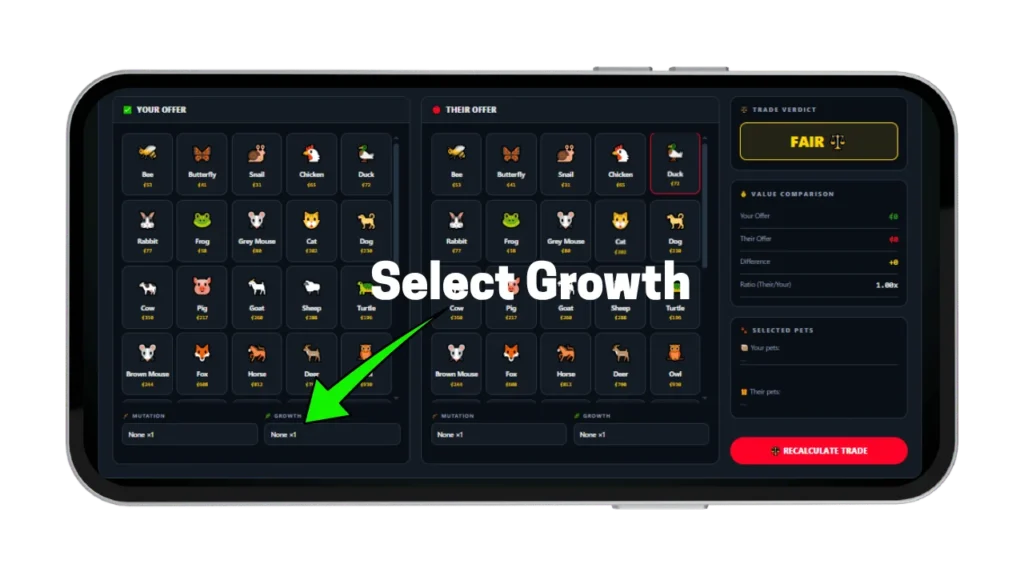
WFL System Explained — Win, Fair, and Lose
Players who search “wfl grow a garden” are asking one question: is this swap safe? Every Grow a Garden WFL result comes from a fixed rule, not an opinion, and the same rule drives any WFL trade verdict on this page. A trade is Fair when the two totals sit within 15 percent of each other, and outside that band the verdict becomes Win or Lose depending on which side is ahead. In ratio terms, Fair runs from roughly 0.87 to 1.15, Win starts above 1.15, and Lose starts below 0.87. These cutoffs are this calculator’s own setting, so other tools may draw the lines elsewhere.
| Verdict | Ratio | What it means |
|---|---|---|
| Win | Above 1.15 | The other side is more than 15 percent ahead of your offer |
| Fair | 0.87 to 1.15 | Both totals sit within 15 percent of each other |
| Lose | Below 0.87 | Your side is more than 15 percent ahead of theirs |
What a ‘Win’ Verdict Means for Your Inventory
A Win in this Grow a Garden trade calculator means the other side’s total is more than 15 percent above the first side’s, so the player receives more Sheckle value than they give. That does not always mean accept, since a collector may want the exact pet being given away. A surprise Win also deserves a second look, because a wrong dropdown on one side often causes it.
What a ‘Fair’ Trade Means for Both Parties
Fair means both totals fall within 15 percent of each other, which is the result a healthy trade should return. A Phoenix at ¢36.0K plus a Dragon at ¢13.8K totals ¢49.8K, and a Griffin at ¢50.8K sits at a ratio of 1.02, so that swap reads Fair. The same label also covers a ratio of 1.14, where a counter-offer could still shift the deal. A Grow a Garden fair trade calculator earns its value by showing that difference instead of hiding it under one label.
What a ‘Lose’ Verdict Means and Why Trades Fall Short
A Lose verdict means the first side’s total is more than 15 percent above the other side’s. In the Grow a Garden trade calculator, a Prismatic Dragon at ¢1.22M traded for a Cosmic Wisp at ¢1.02M returns Lose for the dragon’s owner, even though both pets are top-tier. The ratio is 0.84, and adding roughly ¢41K to the Cosmic Wisp side would move the trade back into Fair. Trades usually fall short because of a wrong setting, a rarity label mistaken for value, or a long list of cheap pets standing in for one expensive one.
How to Trade High-Tier Pets in Grow a Garden
High-tier pets carry the biggest swings in value, so input errors cost the most there. The pet grid runs from a Bee at ¢53 to a Prismatic Dragon at ¢1.22M, a spread of more than 23,000 times. A one-step mistake on a cheap pet changes a few Sheckles. The same mistake on a top-tier pet changes hundreds of thousands, so checking a pet’s age 100 weight projection first keeps those errors small.
Understanding Core Pet Trade Value Factors
Three inputs set a pet’s price in the tool: base value, mutation tier, and growth form. The mutation tier multiplies the base value, and the growth form multiplies the result again. Grow a Garden trade value comes from the combined figure, so a mid-tier pet can outrank a higher one. This is also why Grow a Garden trade values change with every dropdown, and why a pet’s listed number alone never tells the whole story. A Griffin at ¢50.8K with Goldsparkle ×6 reaches ¢304.8K, which beats an unmutated Celestial at ¢270.0K.
What This Trade Calculator Covers
As a Grow a Garden pet trade calculator, the tool compares pets only. Crops, gear, and other items are not in the grid, so a crop-for-pet deal needs the crop priced first with the crop sell price formula. Each side takes one mutation tier and one growth form, applied to the combined value of every pet on that side. When pets on one side carry different tiers, the dominant tier works as an estimate, and the result should be read as approximate.
Handling Divine, Mythical, and Event Trades
Divine and Mythical pets sit near the top of the rarity ladder, and event pets follow their own price pattern, covered further down. Before one of these enters the Grow a Garden trade calculator, its real age and weight are worth checking with the Weight Calculator, which projects growth up to age 100. Passive abilities and hatch odds are covered on the Pet Calculator. With those numbers confirmed, the final pair of pets can go into the trade tool for a verdict.
Pet Attributes That Drive Trade Value
Beyond the three inputs, two pet attributes shape what other traders will pay. Rarity decides how many players want a pet, and growth plus age decide how much of its potential is already built. Both effects show up in the numbers, yet neither is visible from a pet’s name alone. Mutation stacking and the full tier list belong to the Mutation Calculator, so this section sticks to rarity and growth.
Rarity Tier and Base Trading Demand
Rarity tier sets the base value, and base value sets the floor of a trade. A Dragon at ¢13.8K and a Unicorn at ¢15.1K sit close together, while a Phoenix at ¢36.0K is more than double the Dragon. Demand adds a second layer, since a rare pet that few players want can sit unsold for a long time. Grow a Garden trading value therefore depends on how many buyers exist, not only on the listed price.
Growth Classification and Age Premium
Growth form is the second dropdown in the Grow a Garden trade calculator, and it multiplies the whole side, so a Colossal ×3 growth triples the side’s total. Age works differently, because the tool does not read a pet’s age or weight at all. Older, heavier pets usually trade for more, so a pet well above the typical weight for its age deserves a higher counter-offer than the grid number. A quick way to judge that is the age 100 weight projection.
Market Demand Tiers & Item Liquidity Index
Liquidity describes how quickly a pet can be traded away without taking a loss. A high-liquidity pet finds a buyer quickly, while a low-liquidity pet can wait much longer. The calculator measures value, not liquidity, so the two need to be read together. A three-tier view works as a rule of thumb here, though it is not an official index, so cross-check it against the Grow a Garden value list before a big trade.
High-Liquidity Pets (Instant-Trade Currency)
Pets priced between roughly ¢10K and ¢15K in the Grow a Garden trade calculator, such as the Dragon, Tiger, and Lion, usually change hands fastest because many players can afford them. They work like small change. Adding one to a package can balance a deal by a few thousand Sheckles without making it harder to complete. Their value stays modest, so they rarely decide a big trade.
Volatile Event Items & Price Drop Risks
Event pets and limited items can swing in value quickly. Demand can peak while an event is live and cool once it ends. A Grow a Garden trading calculator reads the grid price, and a price copied during an event may be out of date a week later. Checking a recent community source before agreeing to a trade is a sensible habit, and the Grow a Garden value list on the wiki is one place to start, since current Grow a Garden trade values can move after every patch.
Hard-to-Trade Collector Vanity Tiers
Some pets are chased by collectors for looks or prestige rather than for use on the farm. These pets can show a high listed value and still have very few buyers. A top-tier pet such as the Prismatic Dragon at ¢1.22M needs a buyer holding a matching pet or a large package, so the sale can take far longer than a ¢10K deal. Grow a Garden trading value on paper and the price actually reached can differ, and patience closes that gap.
Grow a Garden Trade Calculator vs Guesswork Trading
Guesswork trading leans on memory, old screenshots, and the other player’s word. Memory slips when many pets are involved, a saved value list can be weeks old, and the other player has a reason to round in their own favor. A trading calculator for Grow a Garden replaces all three with one repeatable sum, shown for both sides at once.
| Method | Speed | Mutation and growth | Main weakness |
|---|---|---|---|
| Gut feel | Instant | Rarely counted | Easy to mislead |
| Static value list | One lookup per pet | Separate check | Can be outdated |
| This trade calculator | One click per pet | Applied per side | Community-based values |
A Grow a Garden trading calculator that shares one mutation setting across both offers prices uneven trades wrongly. This one keeps the two sides apart, which matters when a Goldsparkle pet meets a Rainbow pet. The ratio display is the second difference, since it shows how close a Fair result sits to the Win or Lose edge. Run the next offer through the tool before replying, then compare the number with the first instinct.
Pro Trading Strategies to Maximize Wealth
Wealth in pet trading builds through small edges rather than one big flip. The edges come from pricing packages correctly, spotting offers built to confuse, and knowing when values move. Each habit works beside the calculator, not in place of it, and crop deals are priced separately with the crop sell price formula.
Evaluating Multi-Item Package Trades (Adds & Downgrades)
A package trade swaps several small pets for one larger pet, or the reverse. Selecting every pet on each side in the Grow a Garden trade calculator shows the true totals. Consolidating small pets into a bigger one works when the ratio is Fair or better: five Tigers total ¢66.0K, which still falls ¢15.0K short of a Wisp at ¢81.0K. A downgrade, where a pet is swapped for a lower-tier one, deserves a Win verdict to justify the lost tier.
Identifying Value-Manipulated In-Game Trades
Some offers are built to confuse rather than to be fair. Common patterns include a pile of cheap pets hiding a missing high-value one, pressure to answer fast, and a change made after both sides agreed. A page that calls itself a Grow a Garden trading website but asks for a Roblox password or login is another red flag. Trades happen inside the game, and the calculators here need no account.
Timing the Market Around New Content Updates
The Grow a Garden trade calculator shows one moment in time, and values move when new content arrives. New pets, eggs, or events can push older pets down or lift specific ones, so trading in the first hours after a big update means working with numbers that may still be changing. Waiting a short while avoids paying a launch premium or selling into a dip. The pet grid was last reviewed in May 2026, so a patch after that date can shift single values.
Tips to Never Get Scammed or Lose a Trade Again
Three habits cover most of the risk in a pet trade. None needs a rare pet or extra game time, and each takes seconds. The order matters, because skipping the first habit makes the other two less useful, and pet traits like abilities and hatch odds are worth a look before any big swap.
Calculate Trade Fairness Before Making a Counter-Offer
The Grow a Garden Trade Calculator works best when opened the moment an offer arrives: enter both sides, then read the verdict before sending any reply. A Lose result shows exactly what to ask for or remove, because the Sheckle difference is the value to recover. A Win result sets a floor that can be held with confidence. Running the numbers after accepting is too late, since no bargaining power remains.
Verify Mutation and Exact Weight for Both Sides
Read each pet’s mutation and weight directly in the trade window, then match the calculator to what is shown and confirm the tier against the mutation multiplier math. A Goldsparkle ×6 pet entered as None looks worth one-sixth of its real value, and the verdict will be wrong by that much. If a growth form is unknown, testing both None and the likely form gives a safe range instead of a single guess. A GAG trading calculator is only as good as the settings behind it, and the trade window is the source of truth.
Double-Check Second-Trade Adds Before Confirming
Adds often arrive after the main deal looks settled: one more small pet, asked for as a favor or a tie-breaker. Each add changes the totals, so a WFL trade checker needs the updated card selection before anyone confirms. A single added pet can push a Fair result into Lose, particularly near the 1.15 or 0.87 edge. A screenshot of the final verdict next to the trade window keeps a record if a dispute starts later.
Pros and Cons of Automated Trade Calculation
Strengths and limits of the Grow a Garden trade calculator are listed plainly below.
Pros
- Both offers compared side by side
- Mutation and growth set separately per side
- Verdict updates instantly after every click
- Exact difference and ratio always shown
- Works on phone, tablet, and desktop
Cons
- Pet values come from community testing
- Age and weight are not included
- One mutation tier applies per side
- Values shift after game patches
- Only pets are supported, not crops
Frequently Asked Questions
Conclusion: Trading With Confidence
Pet trades go wrong when the numbers arrive after the decision. A trade calc that runs before the reply is the simplest fix. The Grow a Garden Trade Calculator moves them to the front by pricing both offers, applying each side’s mutation and growth, and returning Win, Fair, or Lose with the exact Sheckle gap.
Before the next offer, open the tool, set both sides, check the ratio, and confirm the mutation and weight shown in the trade window. The full calculator hub lists every other tool, including the ones that fill the gaps this tool leaves.
Values were last reviewed in May 2026, and this fan-made site is not affiliated with Roblox or the Grow a Garden developers.